Dino Art Studio for Kids
Reviews
Dino Art Studio for Kids is built for very young users, and its strengths follow from that focus: large controls, touch and mouse support, and a fill tool that keeps coloring neat without demanding precision. The dinosaur theme gives the activity a clear identity, while saving and printing finished pictures adds a sense of completion. The main limitation is scope: this is a coloring activity rather than a broader art program, so children who want drawing tools or more complex projects may outgrow it quickly.
Description
Coloring Prehistoric Scenes
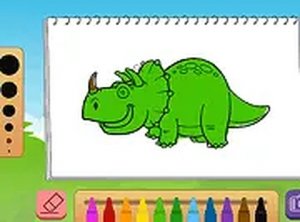
Dino Art Studio for Kids starts with a simple choice: pick one dinosaur illustration from a set of prehistoric scenes. A side palette offers a range of bright shades, and children apply color by tapping or clicking the areas they want to fill. The tool fills each section neatly, which helps younger users stay within the lines without needing precise dragging. Colors can be swapped at any time, so the same picture can be recolored in different combinations before it is saved.
Designed for Young Hands
Menus and controls use large buttons and clear icons, so very young children can navigate without adult help. The game runs directly in a web browser, with no software to install, and adapts to tablets, smartphones, and desktop monitors. A full-screen mode removes surrounding distractions and keeps attention on the artwork. Because the interface is browser-based, it works on most modern devices without setup.
Saving and Sharing Finished Art
Once a picture is complete, players can save the image to their device. Saved files can be shown to family and friends, printed, or kept as digital keepsakes. This gives children a concrete result from each session and a way to track their artistic progress over time. The saving step also encourages a sense of accomplishment, since the finished piece can leave the screen and become something tangible.
Learning Through Play
Coloring within the lines supports fine motor coordination and hand-eye control. Choosing colors and deciding where to place them introduces basic creative decision-making. The dinosaur theme presents prehistoric animals in a gentle, non-threatening way, which can make the activity appealing to children who are curious about dinosaurs. The game is free to play, requires no downloads, and is supported by ads without collecting personal information.




Editorial Notes