Quick Tap Pattern Game
Puzzle Reaction Focus Timing Pattern Recognition Browser Game
Quick Tap Pattern Game
100
Developer: Inferno Wanderer Games
Updated: 2026-10-01

Reviews

Quick Tap Pattern Game keeps its scope narrow: reproduce a growing tile sequence, avoid mistakes, and try to beat your own score. The absence of levels, checkpoints, or accounts makes it easy to start and stop, and the feedback loop is clear enough to understand without reading instructions. Desktop-only design and a few-minute round length limit its appeal for mobile players or anyone wanting long-form progression.

Description

How a Round Unfolds

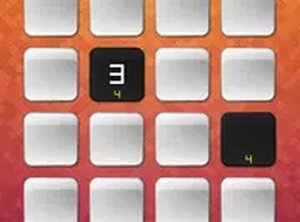
Each round starts with a grid of colored tiles. One tile lights up, then another, and so on, building a sequence you must reproduce by tapping in the same order. A correct tap increases your score. A mistake ends the round and resets your progress. There are no levels or checkpoints, so every session starts from the beginning.

Why the Difficulty Feels Fair

The first few sequences are short and slow enough for a newcomer to follow. As rounds continue, the pattern lengthens and the pace picks up. Later stages ask you to anticipate the next tile while still processing the one in front of you. That gradual ramp-up keeps the challenge demanding without becoming arbitrary.

Controls and On-Screen Feedback

The game is built for desktop browsers and accepts both mouse and keyboard input. Tiles are large and the interface stays uncluttered, so there is nothing to read mid-round. A correct tap triggers a brief highlight or color change; an incorrect tap produces a clear end-of-round signal. Audio is minimal, with gentle success sounds and a distinct failure tone.

Session Length and Replay Value

Individual rounds last only a few minutes, which makes the game easy to fit into a short break. Because there is no save state, each attempt is a fresh challenge, and the only persistent goal is beating your personal high score. That simplicity is the main reason to return: the rules never change, but the speed does.

Editorial Notes

Compatibility

💻 Desktop | 📱 Mobile | 📟 Tablet
– All supported · Best with Chrome or Safari

Faq

Does Quick Tap Pattern Game work on phones or tablets?
The game is designed for desktop screens and may not function properly on mobile devices. Mouse and keyboard inputs are the supported controls. If you only have a phone, expect layout or input issues rather than a smooth experience.
Is there a way to pause or save progress in Quick Tap Pattern Game?
No. Rounds have no checkpoints and progress resets after a mistake, so there is nothing to save. Each session begins at the same starting pace. This design keeps every attempt comparable for high-score chasing, but it also means a single slip costs the whole run.
Do I need to create an account or install anything to play?
No downloads, installations, or accounts are required. Quick Tap Pattern Game runs entirely in a web browser, and a stable internet connection is recommended for smooth performance. That makes it easy to open in a tab and close when you are done.
What happens if I tap the wrong tile in Quick Tap Pattern Game?
An incorrect tap immediately ends the round and resets your progress. A distinct failure tone plays, and a visual signal confirms the mistake. Because there are no extra lives or retries within a round, accuracy matters as much as speed.
Is there a full-screen mode for Quick Tap Pattern Game?
Yes. Full-screen mode is available for players who want to minimize distractions. Since the tiles are already large and the interface is uncluttered, full-screen mainly helps on smaller desktop displays or in busy environments where on-screen clutter competes for attention.
Who is Quick Tap Pattern Game best suited for?
It suits players who enjoy short, repeatable challenges built on timing and focus rather than story or exploration. The gentle opening pace makes it approachable for newcomers, while the later speed increases give experienced players a reason to keep chasing a higher score.