Planetary Guardian Defense
Reviews
Planetary Guardian Defense offers a satisfying blend of quick reflexes and strategic planning. The clean interface and dynamic threat variety keep each session engaging. The escalating difficulty provides a rewarding challenge for players looking to improve their high scores. It is an excellent choice for both short bursts of play and longer gaming sessions.
Description
Game Introduction
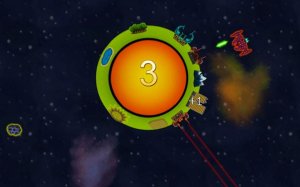
Planetary Guardian Defense is an action-arcade game that places you in the role of a protector of a planet. Your objective is to prevent a steady stream of asteroids and alien ships from colliding with the planet. The game combines fast reflexes with strategic thinking, as you must anticipate and block incoming threats from various directions. Each moment requires focus, and the challenge increases the longer you survive. This is a pure arcade experience with simple controls and deep gameplay, making it suitable for quick sessions or extended play.
How to Play
To play Planetary Guardian Defense, use your mouse or touch-screen to control a protective shield that orbits the planet. Your goal is to position the shield in the path of incoming asteroids and alien ships before they strike. Timing and anticipation are essential, as hazards come from different directions and speeds. Each successful block adds to your score, and the game continues until the planet takes too much damage. The longer you last, the higher your score and the greater the difficulty, encouraging you to improve your skills with each attempt.
Game Features
The game features rapid reflex-driven gameplay that keeps you engaged. It offers strategic depth, as you learn to prioritize threats and manage shield positioning. The clean user-friendly design makes it accessible to all players. A dynamic variety of threats, including asteroids and alien ships, ensures each session feels fresh. Universal accessibility means you can play on any device with a browser.
Tips for Success
To succeed in Planetary Guardian Defense, focus on anticipating the direction of incoming hazards. Prioritize larger threats first, as they may cause more damage. Practice regularly to improve your reaction time and learn the patterns of alien ships. Staying calm and maintaining steady control of the shield will help you survive longer and achieve higher scores.
Compatibility
Faq
Can I play Planetary Guardian Defense on mobile devices?
Is there a leaderboard or high score system in Planetary Guardian Defense?
Does the game have different difficulty levels?
What happens when the planet takes too much damage?
Are there different types of alien ships in the game?
Can I pause the game during play?
More Like This

Timing Bird Arcade Challenge
Timing Bird Arcade Challenge is a fun, fast-paced game that sharpens reflexes with simple, addictive gameplay.

Bug Buddies Match 3 Puzzle
A delightful match-3 puzzle with cute bugs and a gentle timer. Perfect for quick, relaxing play sessions.

Gold Rush Miner: Wild West Digging Game
A delightful family-friendly digging game that captures the thrill of treasure hunting with simple controls and colorful graphics.

Catch Arcade Reflex Game
A fun, addictive reflex game with unpredictable falling objects that keeps you on your toes.

Color Path 3D Runner
Color Path 3D Runner offers simple, addictive gameplay with bright visuals and smooth controls. Perfect for quick breaks.

Quick Drop Arcade Challenge
A fun, fast-paced arcade game that tests your timing and reflexes. Great for quick play sessions.
Castle Guardian: Tower Defense
Simple, addictive tower defense with smooth controls and a satisfying difficulty curve. Great for quick sessions.
Tinto Coin Quest
A delightful 2D platformer with 8 balanced levels, colorful graphics, and simple controls perfect for all ages.

Dino Jump Arcade
A simple, addictive jumping game with bright graphics and no violence. Perfect for quick fun.

Wild Jungle Jigsaw Puzzle
A beautifully calm jigsaw puzzle with vibrant jungle scenes. Perfect for relaxation and family fun.