Alphabet Classifier: Quick Letter Challenge
Reviews
Alphabet Classifier: Quick Letter Challenge delivers exactly what its name suggests: a fast, focused drill on letter classification. The two-button interface and clean visuals keep the experience frictionless, while the progressive speed increase adds a light challenge. It is best suited for young learners or anyone wanting a quick cognitive warm-up. The lack of multiplayer or deeper progression may limit long-term appeal, but as a short educational tool, it succeeds.
Description
Core Sorting Mechanic
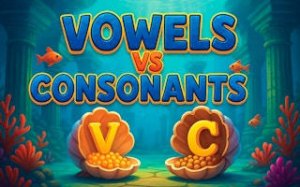
Alphabet Classifier: Quick Letter Challenge presents a single letter on screen. The player must choose whether it belongs to the vowel set (A, E, I, O, U) or the consonant group. Two large buttons handle input, keeping the action direct. Correct picks add to the score; errors briefly pause the sequence to allow a mental reset. This loop repeats with increasing speed, demanding both knowledge and fast decision-making.
Progressive Difficulty Curve
The challenge escalates as players succeed. Early rounds move at a comfortable pace, giving newcomers time to learn. As accuracy improves, the interval between letters shortens, pushing reaction limits. This gradual ramp keeps the activity engaging without overwhelming beginners. More experienced users can aim for high scores by maintaining precision under pressure. The design ensures that repeated play leads to measurable improvement in both letter recall and processing speed.
Visual Design and Accessibility
The screen layout uses large, clear fonts and high-contrast colors to minimize eye strain. Buttons are spaced generously, reducing accidental taps on mobile devices. No distracting animations or sound effects interfere with focus. The game works equally well on desktop browsers and tablets, with touch and mouse input supported. This simplicity makes it suitable for young children just learning the alphabet as well as older players looking for a quick cognitive drill.
Learning Outcomes and Family Use
Regular sessions help reinforce the distinction between vowels and consonants, a foundational reading skill. The timed nature encourages quick recall, which transfers to better reading fluency. Families can play together, taking turns to beat each other's scores. The non-competitive mode allows individual practice without pressure. Because the content is purely educational, parents can let children play unsupervised. The game also serves as a warm-up activity in classroom settings or during homework breaks.






Editorial Notes