Picture Sliding Puzzle Quest
Reviews
This sliding puzzle delivers exactly what fans of the genre expect: straightforward mechanics with enough visual variety to stay interesting. The timer adds a nice motivational layer without being punishing. Controls are responsive on both desktop and mobile, and the lack of downloads makes it easy to jump in for a quick session. A solid choice for anyone looking for a relaxing mental workout.
Description
Core Gameplay Loop
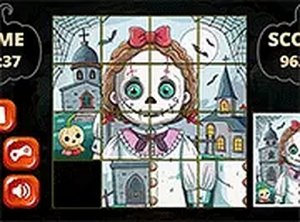
At its heart, this is a tile rearrangement puzzle. Players are presented with a grid of shuffled pieces that form a complete picture when correctly ordered. The challenge lies in sliding one tile at a time into an empty space, gradually reconstructing the original image. This simple interaction creates a satisfying loop of trial, error, and eventual success.
Visual Variety and Progression
Each level introduces a fresh image to solve, keeping the experience visually engaging. The puzzles range from simple layouts to more complex grids, offering a natural difficulty curve. As players advance, they encounter new pictures that require sharper observation and more deliberate planning to complete.
Time-Based Motivation
A built-in timer tracks how quickly each puzzle is solved, adding a light layer of pressure for those who enjoy racing against the clock. This feature encourages efficient movement and strategic thinking, but the game remains accessible for those who prefer a more leisurely pace. The timer serves as a personal benchmark rather than a strict requirement.
Accessibility and Platform Support
Designed for web browsers, this puzzle runs smoothly on both desktop computers and mobile devices. Players can use mouse clicks on a computer or touch gestures on a phone or tablet. The interface adapts to different screen sizes, and a full-screen mode is available for a more focused experience. No installation or download is necessary.
Strategic Approaches
Common strategies include solving the border tiles first to establish a frame, then working inward row by row. Others prefer to focus on distinct color blocks or patterns within the image. The game rewards patience and methodical thinking, making it a good choice for players who enjoy systematic problem-solving.