Nautical Coloring Pages for Young Artists
Reviews
Nautical Coloring Pages for Young Artists is a straightforward digital coloring activity for children. Its strengths are the simple tap-to-fill interface, the undo button that encourages experimentation, and the absence of ads or accounts. The timer adds a light challenge for kids who want to improve speed and precision. The pirate theme stays adventure-focused without frightening content, making it suitable for independent play. The main limitation is that the input does not describe additional modes or customization beyond color choice.
Description
Choosing a Scene and Filling Sections
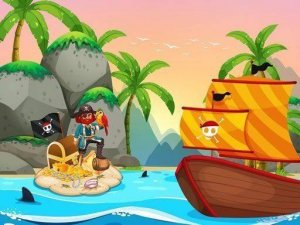
Nautical Coloring Pages for Young Artists opens with a selection of pirate-themed images, such as a treasure map or a sailing ship. Each picture is divided into distinct sections. A palette of bright colors sits at the bottom of the screen. To color, the player taps or clicks a color, then taps the area they want to fill. The interface is built for small fingers and runs on both computers and tablets.
Timer, Scoring, and Undo
A timer tracks how quickly each image is completed. Coloring efficiently without going outside the lines leads to a better final score. If a mistake happens, an undo button corrects it instantly. Players can switch between colors at any time, which encourages experimenting with different combinations rather than sticking to one scheme.
Saving and Sharing Artwork
Once a picture is finished, it can be saved directly to the device. This lets children show their creations to family and friends or print them out for display. No account creation or login is required, so the process stays simple and immediate from start to finish.
Focus, Fine Motor Skills, and a Safe Theme
The activity promotes concentration and fine motor skills as children carefully fill each section. The pirate theme adds an element of adventure without any frightening or violent content. Parents can feel confident letting their kids play independently in a completely ad-free environment.
Getting Better Results
To improve speed and neatness, start with larger sections before moving to smaller details. Use the undo feature freely to refine your work. Trying unexpected color combinations can make each pirate scene feel unique and personal.


Editorial Notes