Precision Parking 3D
Reviews
Precision Parking 3D delivers exactly what its name suggests: a series of parking challenges governed by realistic physics. The sequel adds improved graphics and more stages, but the core loop remains unchanged. Its strength lies in the tension between tight time limits and the need for gentle, precise inputs. Players who enjoy methodical driving puzzles will find plenty to master, while those seeking variety or action may find the experience narrow. The family-friendly design and optional online competition broaden its appeal.
Description
Core Parking Mechanics
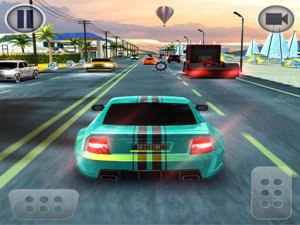
In Precision Parking 3D, the objective is straightforward: guide a vehicle into a designated parking spot. Players use on-screen buttons to steer, accelerate, and reverse. Directional arrows indicate the path to the target, but alignment within the lines is strict. Obstacles like cones, barriers, and other cars demand careful maneuvering. Realistic physics govern every turn and reverse, so gentle inputs produce better results than abrupt corrections. Each level imposes a time limit, rewarding efficient planning over trial and error.
Environment and Difficulty Progression
Settings range from open lots to multi-level garages. Early stages offer generous space, while later levels introduce tighter corners, narrower gaps, and more obstacles. The sequel builds on the original with improved graphics and additional stages, so returning players encounter fresh layouts. Difficulty scales through sharper turns and faster decision-making, not through arbitrary restrictions. The variety keeps the challenge from feeling repetitive, though the core loop remains consistent.
Controls and Realism
Controls are intentionally simple: buttons for steering, acceleration, and braking or reversing. What matters is how the car responds. The physics simulation makes the vehicle feel weighty, so momentum and turning radius affect every move. Players must anticipate how the car will drift or stop rather than rely on instant reactions. This realism extends to collision detection—clipping a cone or barrier typically ends the attempt or costs valuable time.
Competitive and Social Play
An online mode may allow competition against friends or global players for the best scores. This adds a layer of replayability beyond the single-player stages, though the primary experience remains solo parking challenges. The game is designed to be family-friendly and suitable for short or longer play sessions, making it accessible to a wide audience.






Editorial Notes